Should You Buy the iMac?
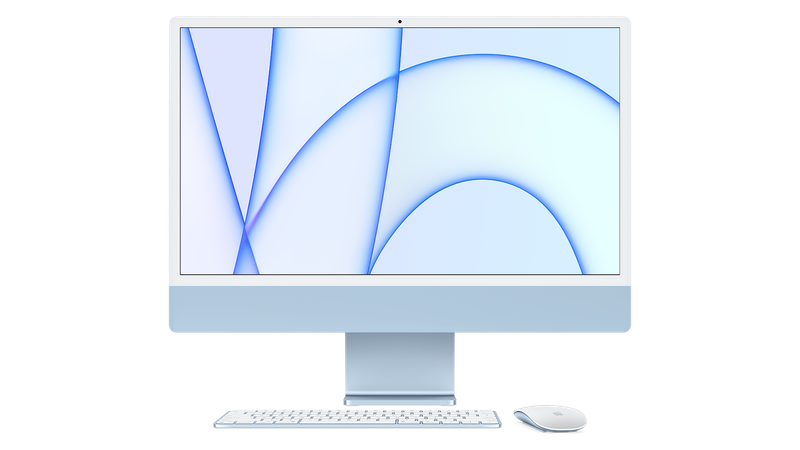
The iMac is Apple's most affordable desktop machine, featuring a 24-inch display and the latest M3 chip. The iMac is currently Apple's only desktop Mac with a built-in display.
Apple last updated the iMac in October 2023, and a refresh is not expected until late 2024 or early 2025. Given that an update is several months away, now is a good time to buy the iMac.
Pricing on the iMac starts at $1,299 for the entry-level model with M3 chip. Apple does not have an iMac with a larger display, but there are higher-powered desktop machines available, including the Mac Studio and the Mac Pro. The Mac Studio and Mac Pro are equipped with faster chips for more intensive system tasks, but they are much more expensive. The Mac Studio is priced starting at $1,999, and the Mac Pro is priced starting at $6,999.
The 24-Inch M3 iMac
Contents
Apple in October 2023 introduced a refreshed 24-inch M3 iMac, an overhaul of the colorful desktop machine that first came out in 2021. The iMac now features an Apple-designed M3 Arm-based chip that replaces the M1 chip and brings significant speed and efficiency improvements.
The M3 chip is Apple's first 3-nanometer chip, built on a more advanced node. The M3 has an 8-core CPU with four high-efficiency cores and four high-performance cores along with an integrated GPU that has up to 10 cores. The M3 is also used in the 14-inch MacBook Pro and the latest MacBook Air models.
The iMac with M3 chip is up to 2x faster than the M1 iMac, with support for up to 24GB of unified memory. Apple added hardware-accelerated ray tracing and mesh shading to provide more accurate lighting and shadows in video games, and to make 3D design faster. There's also a media engine and a 16-core Neural Engine.
Compared to the M1 iMac, Safari performs up to 30 percent faster, games have up to 50 percent faster frame rates, and apps like Microsoft Excel are up to 30 percent faster. Up to 12 streams of 4K video can be edited at once, and video editing in apps like Final Cut Pro is up to 2x faster.
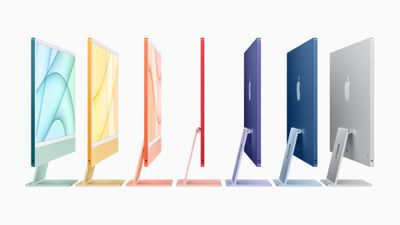
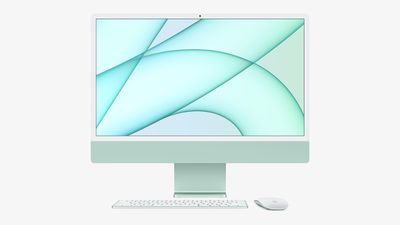
There are no major external design changes to the M3 iMac. The machine continues to feature a body that is just 11.5 millimeters thick, and there is a slim stand that allows the angle of the display to be adjusted. Apple is selling the iMac in a range of bright colors, including green, blue, pink, silver, orange, yellow, and purple. At the front of the iMac, there are softer, pastel colors, but the back of the iMac features much brighter and bolder colors. Powering the iMac is a magnetic power connector with a color-matched woven cable.
The 24-inch 4.5K display features a resolution of 4480-by-2520, with 11.3 million pixels, 500 nits brightness, P3 wide color, more than a billion colors, and True Tone to match the color temperature of the display to the ambient lighting for a more natural viewing experience.
Apple's M3 iMac includes a 1080p FaceTime HD camera with an updated image signal processor for improved performance in low light, and the Neural Engine in the M3 chip allows for better noise reduction, greater dynamic range, and improved auto exposure and white balance.
The iMac also offers studio-quality microphones and a six-speaker sound system with strong bass and clear mids and highs, along with support for Dolby Atmos and spatial audio.

There are two Thunderbolt 3/USB 4 ports at the back of the iMac, along with two additional USB-C ports for some models. The iMac supports up to a single 6K external display, and offers a headphone jack on its side. A 1Gb/s Ethernet port is available in the power adapter for the higher-end model, allowing for a less cluttered cable setup.
The iMac has Wi-Fi 6E for fast Wi-Fi performance and can be customized with up to 2TB of SSD storage.
The iMac comes alongside color-matched accessories with custom colors for the Magic Keyboard, Magic Mouse, Magic Trackpad, power cord, and Lightning to USB-C cable for charging the accessories. Apple sells the iMac with a matching Magic Keyboard, with or without a number pad, and some models feature Touch ID built directly into the keyboard.
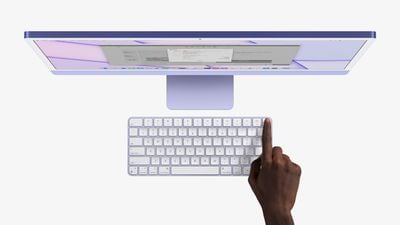
The Magic Keyboard features the first wireless Touch ID implementation, using a dedicated security component on the keyboard that communicates directly with the Secure Enclave in the M3 for seamless unlocking or making Apple Pay purchases.
The entry-level M3 iMac is available for $1,299, while an upgraded model is priced starting at $1,499.
Note: See an error in this roundup or want to offer feedback? Send us an email here.
How to Buy
The M3 iMac models can be ordered from the online Apple Store or purchased at an Apple retail location at prices starting at $1,299. As of February 2024, Apple is selling discounted versions from its refurbished store in the United States and other countries.
Reviews
Reviewers were impressed with the performance of the M3 chip in the 24-inch iMac, which is up to 40 percent faster than the M1 chip. The speed improvement is a "noticeable difference," especially with anything that uses the GPU.
The M3 iMac is still the best all-around Mac for those who need a computer for day-to-day use, but reviewers were unhappy with the Lightning accessories that Apple continues to include with the machine. Despite the transition to USB-C, the Magic Mouse and Magic Keyboard need a Lightning cable to charge.
Though the iMac is positioned as a basic machine, it has a starting price of $1,299, which only gets you 8GB of memory and a 256GB SSD, which some reviewers do not feel is worth the cost. Users need to spend another $200 to get an additional two USB-C ports, and $30 to get a Gigabit Ethernet port.
Additional iMac reviews can be found in our full review roundup.
Design
The 2023 iMac features the same compact and thin design as the prior-generation iMac, and Apple has not changed the design at all. The body of the all-in-one machine is just 11.5mm thick, and it has a slim side profile as a result.

With the transition to Apple silicon, Apple consolidated the logic board and thermals, facilitating the thin design. The iMac has thicker bezels than most Macs, with a chin at the bottom that houses the hardware. A color-matched stand is included.
Color Options
The iMac comes in a range of seven colors, including green, yellow, orange, pink, purple, blue, and silver. There are softer colors and thinner borders on the front to allow users to focus on their on-screen content, while the back features a more bold, saturated color. There is also a power connector that attaches to the back of the iMac, along with a woven two-meter-long color-matched cable.
Display
The M3 iMac features a 24-inch 4.5K Retina display with 11.3 million pixels, 500 nits of brightness, a P3 wide color gamut, and over a billion colors.
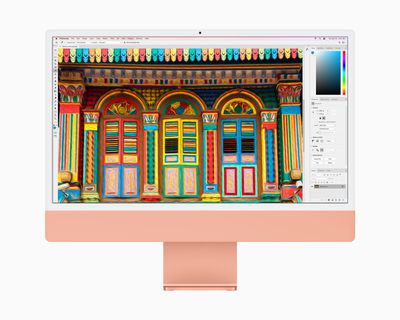
The display features True Tone technology, which automatically adjusts the color temperature of the display as the environment changes for a more natural viewing experience. In addition, the 4.5K Retina display features Apple's standard anti-reflective coating.
Ports
All of the M3 iMacs include two Thunderbolt ports for fast data transfers, giving customers high-performance options to connect to a range of external devices, including support for a 6K external display, such as the Apple Pro Display XDR. The iMac configuration with a 10-core GPU offers two additional USB-C ports and also features a 1Gbps Ethernet port in the power adapter, allowing for a less cluttered desktop.

The power adapter with Ethernet port is available as an add-on option for the lower-end iMac, but there is no option to purchase the additional two ports so the four port setup is limited to higher-end models.
There is also a 3.5mm headphone jack on the left-hand side of the machine for wired audio, and the headphone jack supports high-impedance headphones.
M3 Apple Silicon Chip
The iMac is only available with Apple's M3 chip, which offers notable performance improvements over the prior-generation M1 chip. The M3 chip has an 8-core CPU and either an 8-core or 10-core GPU, and the GPU in particular has been significantly upgraded.
The M3 chip is built on Apple's next-generation 3-nanometer architecture. Apple says that the M3 represents the "biggest leap forward in graphics architecture ever for Apple silicon" with faster and more efficient GPU technology. The M3 GPU supports Dynamic Caching, hardware-accelerated ray tracing, and mesh shading.
Dynamic Caching allocates the use of local memory in hardware in real time, so only the exact amount of memory needed is used for each task. It increases the average utilization of the GPU, thereby increasing performance for demanding pro apps and games.
With hardware-accelerated ray tracing, light looks more realistic as it interacts with a scene, allowing for more physically accurate images. Game developers can use the ray-tracing and mesh shading for more accurate shadows and reflections as well as more efficient geometry processing.
According to Apple, the M3 chip is able to deliver 2.5x better GPU speeds than the M1 chips while using half the power.
As for the CPU, Apple says that it has improved the architecture of the performance and efficiency cores. The M3 performance cores are up to 30 percent faster than the M1 performance cores, and the M3 efficiency cores are up to 50 percent faster than the M1 efficiency cores.
Benchmarks of the M3 chip in a MacBook Pro confirm that it is 20 percent faster than the M2 chip, as Apple says. The M3 chip earned a single-core score of around 3,000 and a multi-core score of around 11,700. The M2 chip has a single-core score of 2,600 and a multi-core score of 9,700.
Media Engine
Apple includes a media engine in its Apple silicon chips to speed up video processing while preserving battery life. The M3 offers dedicated acceleration for the ProRes video codec, along with video encode/decode engines and hardware accelerated support for H.264, HEVC, ProRes, and ProRes Raw.
Memory
The M3 uses a system-on-a-chip architecture with unified memory and unmatched power efficiency. The M3 supports up to 24GB unified memory, up from 16GB in the M1 iMac, and it offers 100GB/s memory bandwidth.
Custom Technologies
There's a 16-core Neural Engine built into the M3 chip that handles machine learning acceleration and boosts camera performance alongside the custom image signal processor, plus there's a display engine that can drive an external display.
The M3 supports one external display at 6K resolution at up to 60Hz.
There are also additional integrated Thunderbolt controllers for more I/O bandwidth, and a built-in Secure Enclave provides features like hardware-verified secure-boot and runtime anti-exploitation features.
Other Features
RAM
The M3 iMac comes with 8GB of unified memory standard, but it is possible to configure it with up to 24GB of memory using Apple's build-to-order options.
SSD
The stock configurations of the M3 iMac come with either 256GB or 512GB of storage, but users can configure them with up to 2TB of SSD storage.
Connectivity
The iMac now features Wi-Fi 6E connectivity for faster wireless performance and the ability to connect to 6GHz networks. It also supports Bluetooth 5.3.
FaceTime Camera
The 24-inch iMac includes a 1080p FaceTime HD camera, which Apple calls "the best ever" camera in a Mac. The camera delivers high-quality video and great performance in low light, according to Apple. The iMac also takes advantage of the image signal processor in the M3 chip and the Neural Engine, enhancing camera image quality with better noise reduction, greater dynamic range, and improved auto exposure and white balance.
Speakers
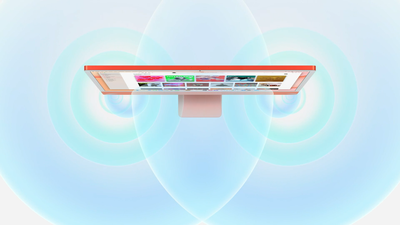
The iMac features a six-speaker sound system. It has two pairs of force-cancelling woofers placed side by side for improved bass response, while reducing unintended vibrations. Each pair is balanced with a high-performance tweeter. The overall six-speaker sound system produces a "massive sound stage with strong, articulate bass and crystal-clear mids and highs," and it offers support for spatial audio.
'Studio Quality' Microphones
The iMac features a studio-quality three-microphone array for clearer calls and voice recordings. The mics are positioned to reduce feedback from the rest of the system, while directional beamforming allows them to better ignore background noise and focus on a user's voice.
Peripherals
Magic Mouse and Magic Trackpad
The iMac comes with a color-matched Magic Mouse, and users can opt to upgrade to or add the color-matched Magic Trackpad.

Magic Keyboard
The M3 iMac comes with Magic Keyboard, with the keyboard that is offered with the mid- and high-end configurations features Touch ID. Touch ID on the iMac makes it easier than ever to securely log in, make purchases with Apple Pay, or switch user profiles with the touch of a finger.
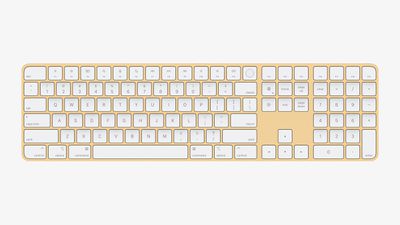
Implemented wirelessly, Touch ID uses a dedicated security component on the keyboard that communicates directly with the Secure Enclave in the M3 chip, creating an encrypted channel to protect users' fingerprint data from end to end.
Customers can choose from three models of Magic Keyboard with aluminum enclosures that are color-matched to the iMac, with options including Touch ID and a numeric keypad. The entry-level Mac comes with a standard non-Touch ID keyboard by default, which can be upgraded, while the $1,499 model's price includes the Touch ID keyboard option.
Available Models
There are three standard configuration 24-inch iMac models available from Apple:
- $1,299 - Apple M3 chip with 8-Core CPU and 8-Core GPU, 8GB memory, 256GB SSD, two Thunderbolt / USB 4 ports, and Magic Keyboard.
- $1,499 - Apple M3 chip with 8-Core CPU and 10-Core GPU, 8GB memory, 256GB SSD, two Thunderbolt / USB 4 ports and two USB 3 ports, gigabit Ethernet, and Magic Keyboard with Touch ID.
- $1,699 - Apple M3 chip with 8-Core CPU and 10-Core GPU, 8GB memory, 512GB SSD, two Thunderbolt / USB 4 ports and two USB 3 ports, gigabit Ethernet, and Magic Keyboard with Touch ID.
Build to Order Options
Entry-level 24-inch iMac with 256GB of storage:
- 16GB Memory - +$200
- 24GB Memory - +$400
- 512GB SSD - +$200
- 1TB SSD - +$400
- Gigabit Ethernet - +$30
Mid-level 24-inch iMac with 256GB of storage:
- 16GB Memory - +$200
- 24GB Memory - +$400
- 512GB SSD - +$200
- 1TB SSD - +$400
- 2TB SSD - +$800
High-end 24-inch iMac with 512GB of storage:
- 16GB Memory - +$200
- 24GB Memory - +$400
- 1TB SSD - +$200
- 2TB SSD - +$600
Color-Matched Accessory Options
All M3 iMac configurations come with a color-matched Magic Mouse as standard, but users can opt to upgrade to the Magic Trackpad, or purchase both the Magic Mouse and the Magic Trackpad together.
- Magic Trackpad - +$50
- Magic Mouse + Magic Trackpad - +$129
Apple also notes that it is possible to upgrade from the standard Magic Keyboard with the entry-level iMac to the Magic Keyboard with Touch ID for an additional $50. All base configurations offer the option of upgrading to the Magic Keyboard with Touch ID and Numeric Keypad from the Magic Keyboard with Touch ID for an additional $30.
What's Next for the iMac
The 24-inch iMac will be updated with a next-generation M4 chip as soon as late 2024. Production on the M4 processor is set to start in the near future, with the chip to feature improved performance to support Apple's focus on AI.
Rumors suggest that Apple plans to use an upgraded Neural Engine with more cores for processing machine learning and AI tasks.
Apple is working on an iMac with a larger ~30-inch display, but it is in the early stages of development and won't launch until 2025 at the earliest. Rumors suggest the display will be around 32 inches in size, which would make it Apple's largest display built into a computer to date, and it is said to use mini-LED technology like the Pro Display XDR.
Apple has confirmed that it has no plans to release another 27-inch iMac model, but that does not rule out a machine with a larger display.